Human-Computer Interfaces
Human-Computer Interfaces
.jpg)
Human Computer Interface Introduction
Human Computer Interface (HCI) was previously known as the man-machine studies or man-machine interaction. It deals with the design, execution and assessment of computer systems and related phenomenon that are for human use.
HCI can be used in all disciplines wherever there is a possibility of computer installation. Some of the areas where HCI can be implemented with distinctive importance are mentioned below −
* Computer Science − For application design and engineering.
* Psychology − For application of theories and analytical purpose.
* Sociology − For interaction between technology and organization.
* Industrial Design − For interactive products like mobile phones, microwave oven, etc.


The world’s leading organization in HCI is ACM − SIGCHI, which stands for Association for Computer Machinery − Special Interest Group on Computer–Human Interaction. SIGCHI defines Computer Science to be the core discipline of HCI. In India, it emerged as an interaction proposal, mostly based in the field of Design.
Objective
The intention of this subject is to learn the ways of designing user-friendly interfaces or interactions. Considering which, we will learn the following −
Ways to design and assess interactive systems.
Ways to reduce design time through cognitive system and task models.
Procedures and heuristics for interactive system design.
.jpg)
.jpg)
- Historical Evolution
From the initial computers performing batch processing to the user-centric design, there were several milestones which are mentioned below −
👉 Early computer (e.g. ENIAC, 1946) − Improvement in the H/W technology brought massive increase in computing power. People started thinking on innovative ideas.
👉 Visual Display Unit (1950s) − SAGE (semi-automatic ground environment), an air defense system of the USA used the earliest version of VDU.
👉 Development of the Sketchpad (1962) − Ivan Sutherland developed Sketchpad and proved that computer can be used for more than data processing.
👉Douglas Engelbart introduced the idea of programming toolkits (1963) − Smaller systems created larger systems and components.
👉Introduction of Word Processor, Mouse (1968) − Design of NLS (oNLine System).
👉Introduction of personal computer Dynabook (1970s) − Developed smalltalk at Xerox PARC.
👉Windows and WIMP interfaces − Simultaneous jobs at one desktop, switching between work and screens, sequential interaction.
👉The idea of metaphor − Xerox star and alto were the first systems to use the concept of metaphors, which led to spontaneity of the interface.
👉Direct Manipulation introduced by Ben Shneiderman (1982) − First used in Apple Mac PC (1984) that reduced the chances for syntactic errors.
👉 Vannevar Bush introduced Hypertext (1945) − To denote the non-linear structure of text.
Multimodality (late 1980s).
👉Computer Supported Cooperative Work (1990’s) − Computer mediated communication.
👉 WWW (1989) − The first graphical browser (Mosaic) came in 1993.
👉 Ubiquitous Computing − Currently the most active research area in HCI. Sensor based/context aware computing also known as pervasive computing.
Roots of HCI in India
Some ground-breaking Creation and Graphic Communication designers started showing interest in the field of HCI from the late 80s. Others crossed the threshold by designing program for CD ROM titles. Some of them entered the field by designing for the web and by providing computer trainings.
Even though India is running behind in offering an established course in HCI, there are designers in India who in addition to creativity and artistic expression, consider design to be a problem-solving activity and prefer to work in an area where the demand has not been met.
This urge for designing has often led them to get into innovative fields and get the knowledge through self-study. Later, when HCI prospects arrived in India, designers adopted techniques from usability assessment, user studies, software prototyping, etc.
Guidelines in HCI
Shneiderman’s Eight Golden Rules
Ben Shneiderman, an American computer scientist consolidated some implicit facts about designing and came up with the following eight general guidelines −
- 👉 Strive for Consistency.
- 👉 Cater to Universal Usability.
- 👉 Offer Informative feedback.
- 👉 Design Dialogs to yield closure.
- 👉 Prevent Errors.
- 👉 Permit easy reversal of actions.
- 👉 Support internal locus of control.
- 👉 Reduce short term memory load.
These guidelines are beneficial for normal designers as well as interface designers. Using these eight guidelines, it is possible to differentiate a good interface design from a bad one. These are beneficial in experimental assessment of identifying better GUIs.
Norman’s Seven Principles
To assess the interaction between human and computers, Donald Norman in 1988 proposed seven principles. He proposed the seven stages that can be used to transform difficult tasks. Following are the seven principles of Norman −
👉 Use both knowledge in world & knowledge in the head.
👉 Simplify task structures.
👉 Make things visible.
👉 Get the mapping right (User mental model = Conceptual model = Designed model).
👉Convert constrains into advantages (Physical constraints, Cultural constraints,
👉 Technological constraints).
👉 Design for Error.
👉 When all else fails − Standardize.
Heuristic Evaluation
Heuristics evaluation is a methodical procedure to check user interface for usability problems. Once a usability problem is detected in design, they are attended as an integral part of constant design processes. Heuristic evaluation method includes some usability principles such as Nielsen’s ten Usability principles.
Nielsen's Ten Heuristic Principles
- 👉 Visibility of system status.
- 👉 Match between system and real world.
- 👉 User control and freedom.
- 👉 Consistency and standards.
- 👉 Error prevention.
- 👉 Recognition rather than Recall.
- 👉 Flexibility and efficiency of use.
- 👉 Aesthetic and minimalist design.
- 👉Help, diagnosis and recovery from errors.
- 👉 Documentation and Help
The above mentioned ten principles of Nielsen serve as a checklist in evaluating and explaining problems for the heuristic evaluator while auditing an interface or a product.
Interface Design Guidelines
Some more important HCI design guidelines are presented in this section. General interaction, information display, and data entry are three categories of HCI design guidelines that are explained below.
General Interaction
Guidelines for general interaction are comprehensive advices that focus on general instructions such as −
👉 Be consistent.
👉 Offer significant feedback.
👉 Ask for authentication of any non-trivial critical action.
👉 Authorize easy reversal of most actions.
👉 Lessen the amount of information that must be remembered in between actions.
👉 Seek competence in dialogue, motion and thought.
👉 Excuse mistakes.
👉 Classify activities by function and establish screen geography accordingly.
👉 Deliver help services that are context sensitive.
👉 Use simple action verbs or short verb phrases to name commands.
Information Display
Information provided by the HCI should not be incomplete or unclear or else the application will not meet the requirements of the user. To provide better display, the following guidelines are prepared −
👉 Exhibit only that information that is applicable to the present context.
👉 Don't burden the user with data, use a presentation layout that allows rapid integration of information.
👉 Use standard labels, standard abbreviations and probable colors.
👉 Permit the user to maintain visual context.
👉 Generate meaningful error messages.
👉 Use upper and lower case, indentation and text grouping to aid in understanding.
👉 Use windows (if available) to classify different types of information.
👉 Use analog displays to characterize information that is more easily integrated with this form of representation.
👉 Consider the available geography of the display screen and use it efficiently.
Data Entry
The following guidelines focus on data entry that is another important aspect of HCI −
👉 Reduce the number of input actions required of the user.
👉 Uphold steadiness between information display and data input.
👉 Let the user customize the input.
👉 Interaction should be flexible but also tuned to the user's favored mode of input.
👉 Disable commands that are unsuitable in the context of current actions.
👉 Allow the user to control the interactive flow.
👉 Offer help to assist with all input actions.
👉 Remove "mickey mouse" input.
Interactive System Design
The objective of this chapter is to learn all the aspects of design and development of interactive systems, which are now an important part of our lives. The design and usability of these systems leaves an effect on the quality of people’s relationship to technology. Web applications, games, embedded devices, etc., are all a part of this system, which has become an integral part of our lives. Let us now discuss on some major components of this system.
Concept of Usability Engineering
Usability Engineering is a method in the progress of software and systems, which includes user contribution from the inception of the process and assures the effectiveness of the product through the use of a usability requirement and metrics.
It thus refers to the Usability Function features of the entire process of abstracting, implementing & testing hardware and software products. Requirements gathering stage to installation, marketing and testing of products, all fall in this process.
Goals of Usability Engineering
- 👉 Effective to use − Functional
- 👉 Efficient to use − Efficient
- 👉 Error free in use − Safe
- 👉 Easy to use − Friendly
- 👉 Enjoyable in use − Delightful Experience
Usability
Usability has three components − effectiveness, efficiency and satisfaction, using which, users accomplish their goals in particular environments. Let us look in brief about these components.
👉 Effectiveness − The completeness with which users achieve their goals.
👉 Efficiency − The competence used in using the resources to effectively achieve the goals.
👉 Satisfaction − The ease of the work system to its users.
Usability Study
The methodical study on the interaction between people, products, and environment based on experimental assessment. Example: Psychology, Behavioral Science, etc.
Usability Testing
The scientific evaluation of the stated usability parameters as per the user’s requirements, competences, prospects, safety and satisfaction is known as usability testing.
Acceptance Testing
Acceptance testing also known as User Acceptance Testing (UAT), is a testing procedure that is performed by the users as a final checkpoint before signing off from a vendor. Let us take an example of the handheld barcode scanner.
Let us assume that a supermarket has bought barcode scanners from a vendor. The supermarket gathers a team of counter employees and make them test the device in a mock store setting. By this procedure, the users would determine if the product is acceptable for their needs. It is required that the user acceptance testing "pass" before they receive the final product from the vendor.
Software Tools
A software tool is a programmatic software used to create, maintain, or otherwise support other programs and applications. Some of the commonly used software tools in HCI are as follows −
👉 Specification Methods − The methods used to specify the GUI. Even though these are lengthy and ambiguous methods, they are easy to understand.
👉 Grammars − Written Instructions or Expressions that a program would understand. They provide confirmations for completeness and correctness.
👉 Transition Diagram − Set of nodes and links that can be displayed in text, link frequency, state diagram, etc. They are difficult in evaluating usability, visibility, modularity and synchronization.
👉 Statecharts − Chart methods developed for simultaneous user activities and external actions. They provide link-specification with interface building tools.
👉 Interface Building Tools − Design methods that help in designing command languages, data-entry structures, and widgets.
👉 Interface Mockup Tools − Tools to develop a quick sketch of GUI. E.g., Microsoft Visio, Visual Studio .Net, etc.
👉 Software Engineering Tools − Extensive programming tools to provide user interface management system.
👉 Evaluation Tools − Tools to evaluate the correctness and completeness of programs.
HCI and Software Engineering
Software engineering is the study of designing, development and preservation of software. It comes in contact with HCI to make the man and machine interaction more vibrant and interactive.
Let us see the following model in software engineering for interactive designing.
The Waterfall Method
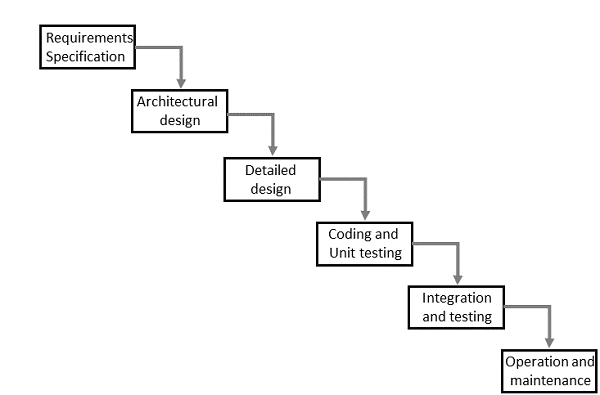
Interactive System Design
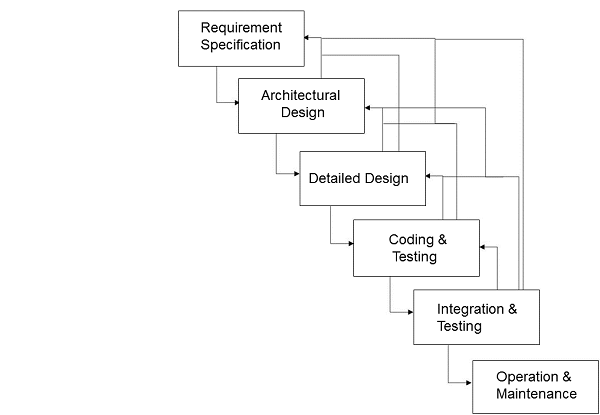
The uni-directional movement of the waterfall model of Software Engineering shows that every phase depends on the preceding phase and not vice-versa. However, this model is not suitable for the interactive system design.
The interactive system design shows that every phase depends on each other to serve the purpose of designing and product creation. It is a continuous process as there is so much to know and users keep changing all the time. An interactive system designer should recognize this diversity.
Prototyping
Prototyping is another type of software engineering models that can have a complete range of functionalities of the projected system.
In HCI, prototyping is a trial and partial design that helps users in testing design ideas without executing a complete system.
Example of a prototype can be Sketches. Sketches of interactive design can later be produced into graphical interface. See the following diagram.
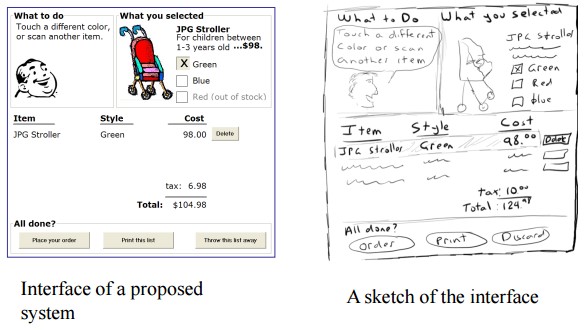
The above diagram can be considered as a Low Fidelity Prototype as it uses manual procedures like sketching in a paper.
A Medium Fidelity Prototype involves some but not all procedures of the system. E.g., first screen of a GUI.
Finally, a Hi Fidelity Prototype simulates all the functionalities of the system in a design. This prototype requires, time, money and work force.
User Centered Design (UCD)
The process of collecting feedback from users to improve the design is known as user centered design or UCD.
UCD Drawbacks
- 👉 Passive user involvement.
- 👉 User’s perception about the new interface may be inappropriate.
- 👉 Designers may ask incorrect questions to users.
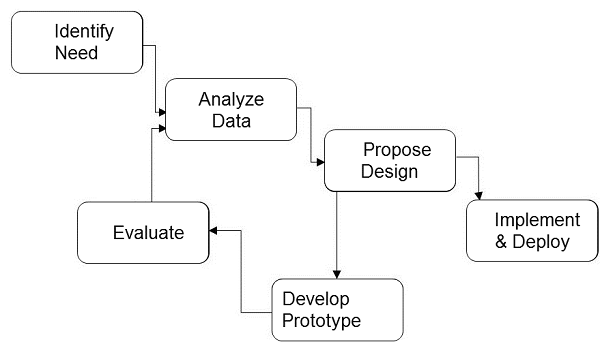
Interactive System Design Life Cycle (ISLC)
The stages in the following diagram are repeated until the solution is reached.
Diagram
GUI Design & Aesthetics
Graphic User Interface (GUI) is the interface from where a user can operate programs, applications or devices in a computer system. This is where the icons, menus, widgets, labels exist for the users to access.
It is significant that everything in the GUI is arranged in a way that is recognizable and pleasing to the eye, which shows the aesthetic sense of the GUI designer. GUI aesthetics provides a character and identity to any product.
HCI in Indian Industries
For the past couple of years, majority IT companies in India are hiring designers for HCI related activities. Even multi-national companies started hiring for HCI from India as Indian designers have proven their capabilities in architectural, visual and interaction designs. Thus, Indian HCI designers are not only making a mark in the country, but also abroad.
The profession has boomed in the last decade even when the usability has been there forever. And since new products are developed frequently, the durability prognosis also looks great.
As per an estimation made on usability specialists, there are mere 1,000 experts in India. The overall requirement is around 60,000. Out of all the designers working in the country, HCI designers count for approximately 2.77%.
HCI Analogy
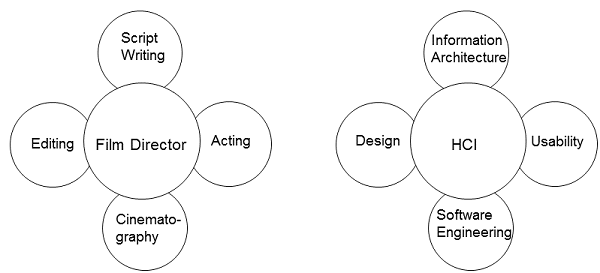
Let us take a known analogy that can be understood by everyone. A film director is a person who with his/her experience can work on script writing, acting, editing, and cinematography. He/She can be considered as the only person accountable for all the creative phases of the film.
Similarly, HCI can be considered as the film director whose job is part creative and part technical. An HCI designer have substantial understanding of all areas of designing. The following diagram depicts the analogy −
click her :- https://amzn.to/3XmwA1o
click her :- https://amzn.to/3Jz9rmC


Comments
Post a Comment